There are two ways to put a script in front of a lens. The cheap one: a tablet or phone running a teleprompter app or web page, mounted near the camera. The professional one: a beam-splitter rig — a sheet of special glass at 45° over the lens, with the text reflected on it from below.
Both show scrolling text. The difference is in the details: where your eyes point, how the setup travels, what it costs, and how “professional” the result needs to look. This guide compares them point by point, and ends with a simple decision rule.

What each option actually is
Tablet or phone teleprompter. Your device runs a teleprompter app or a web-based teleprompter like NanoPrompter. The screen shows the scrolling script; you mount the device under or next to the lens with a cheap holder. Total cost if you already own the device: zero to one mount.
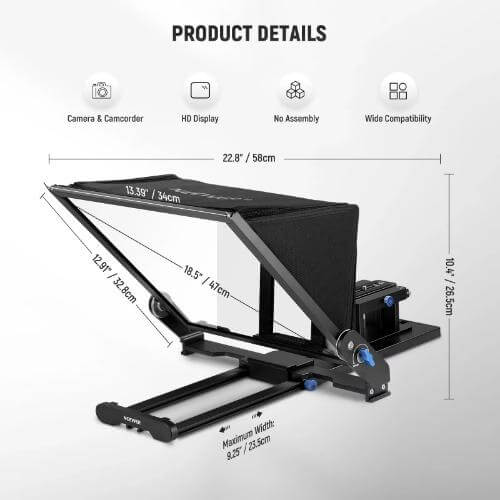
Physical (beam-splitter) teleprompter. A hood with beam-splitter glass sits over the camera lens. A phone or tablet inside the hood displays the script mirrored; the glass reflects it in front of the lens. Your eyes look straight through the glass at the lens while reading text that appears to float over it. Cost: from around 60 € for basic hoods to several hundred for camera-mounted pro rigs with remotes.
A third path exists — projecting text near the lens with a mirror app and a regular glass — but results are inconsistent and we won’t pretend otherwise.
Point by point
| Criterion | Tablet / phone | Physical rig |
|---|---|---|
| Cost | Free (device you own) + optional mount | 60–600 € depending on build |
| Eye line | Slightly off-lens; visible on close-ups | Text over the lens; invisible shift |
| Setup time | 2 minutes | 5–15 minutes, more pieces |
| Portability | Excellent | Bulky; hoods and glass need care |
| Outdoor use | Screen glare can be a problem | Hood shields the glass; better |
| Remote control | Keyboard, or gamepad with NanoPrompter | Often bundled remotes; varies |
| Works with your camera | Yes, any camera nearby | Requires mounting or a tripod plate |
| Failure modes | Low battery, notifications | Glare, reflections, alignment |
The eye-line row deserves honesty: with a tablet under the lens, viewers of a close-up can see your eyes tracking text slightly below the camera. At normal framing (waist up), almost nobody notices. The beam-splitter rig wins this point absolutely — the question is whether your videos need that margin.
When the tablet or phone wins
- You’re starting out. Zero cost means zero risk. Your first ten videos will teach you more than any rig.
- You record at a desk. Laptop or tablet under the monitor, camera on top. The eye line is short and the setup takes two minutes. Any screen becomes a clean reader with fullscreen mode.
- You travel or shoot in different places. A phone and a small tripod fit in any bag. Hoods and glass don’t survive careless backpacks.
- Your framing is waist-up or wider. The off-lens reading is nearly invisible at these distances.
- You change locations mid-shoot. Moving a tablet is nothing; re-aligning a rig on location is a chore.
One practical tip for phones and tablets: enable do-not-disturb before recording. A notification over your script at minute four is a classic.
When the physical teleprompter wins
- Close-ups are part of your style. Beauty, product or direct-address formats where the eyes are the shot. This is where the rig’s floating text — and NanoPrompter’s mirror mode — earn their keep.
- You present to a live room or stage. A rig on a stand lets you face the audience while reading.
- You shoot outdoors. The hood blocks glare that washes out a bare screen.
- You record long format content. Podcasts, courses, keynotes — the comfort of a text floating over the lens pays off over an hour.
- Clients watch the set. Fair or not, a rig reads as “production” on a call or a shoot.
What matters more than the hardware
Whichever option you lean towards, these make a bigger difference than the glass:
- A script written to be spoken. See the script template guide — a good text survives any hardware.
- Practice reading on camera. Our first-time guide covers pace, pauses and eye line.
- Remote control. Changing speed or font without walking to the device keeps takes alive. With NanoPrompter you can use the keyboard or a game controller; many physical rigs include a remote.
A simple decision rule
If your videos are talking-head at desk distance and you’re building an audience: start with the tablet, spend the money on nothing, and buy the rig the day a client or a close-up format demands it. If you already present on stage, shoot close-ups daily, or record hour-long formats: the beam-splitter pays for itself in comfort and eye line.
If you’re leaning towards hardware, below are the teleprompters and mounts we recommend — and whichever you choose, the web teleprompter you’d run on the tablet or inside the rig is free to open right here.


